Stop revising what you already know. Learn from every real-life transcription.
Transcribe real conversations on Android or Windows. Turn the words and grammar rules that block you into flashcards, then review them at the right time.
25 min/month included · No credit card. Android 9+ / Windows 10+.
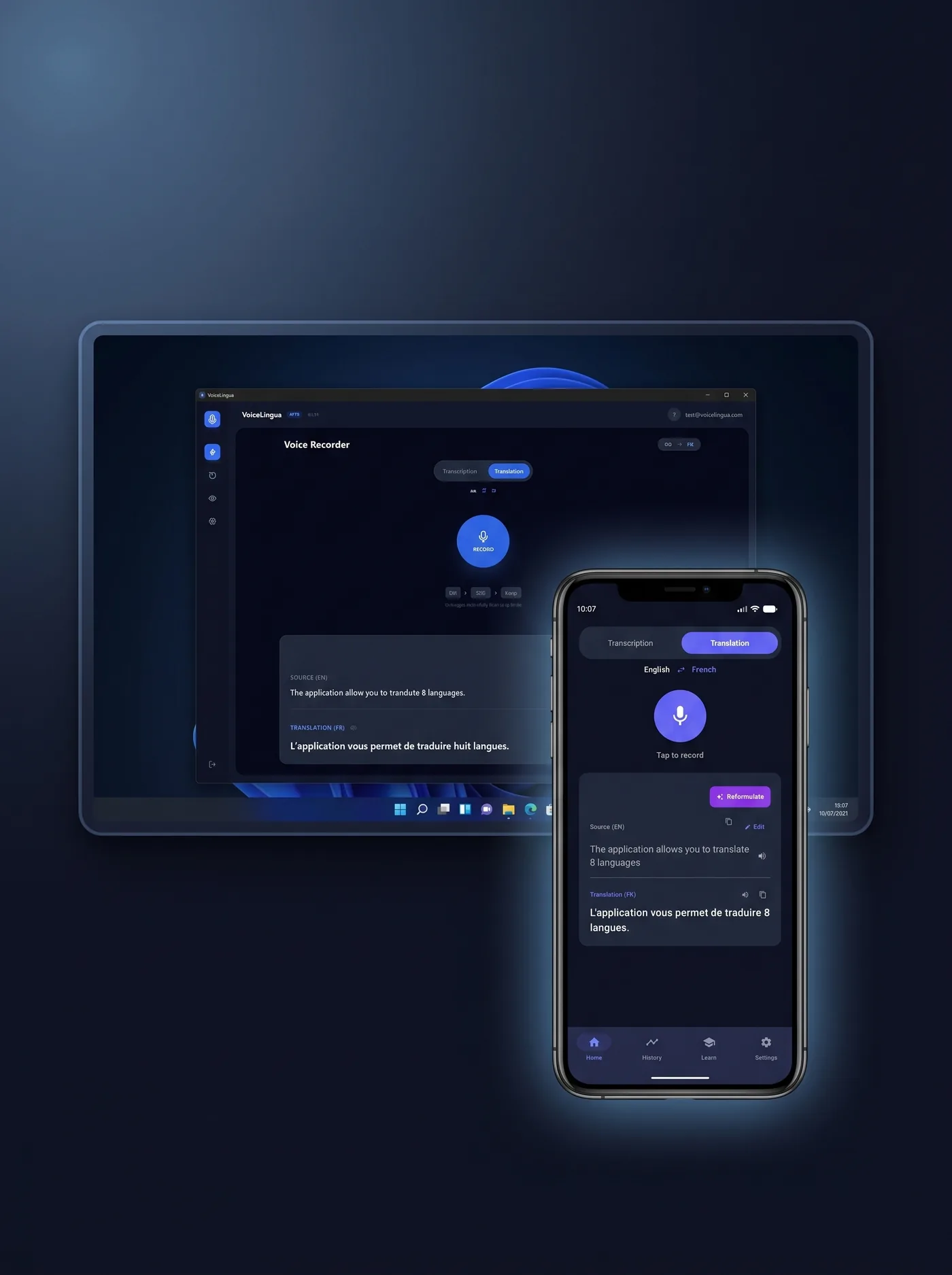

Built for learners stuck at intermediate.
Generic apps drill you on words you already know. VoiceLingua starts from your real life — the conversations you transcribe, the emails and articles you translate. Each one becomes a source of flashcards focused only on the words and rules that block you. Progress simply by doing what you already do.
A word that blocks you? Save it. Review it.
Transcribe a conversation or translate a text, select what you didn't understand, and it becomes a flashcard. That's the loop that turns real life into steady progress. Live transcription, in-context explanations, automatic SM-2 flashcards, writing inside your other apps — no other app connects them in a single loop.
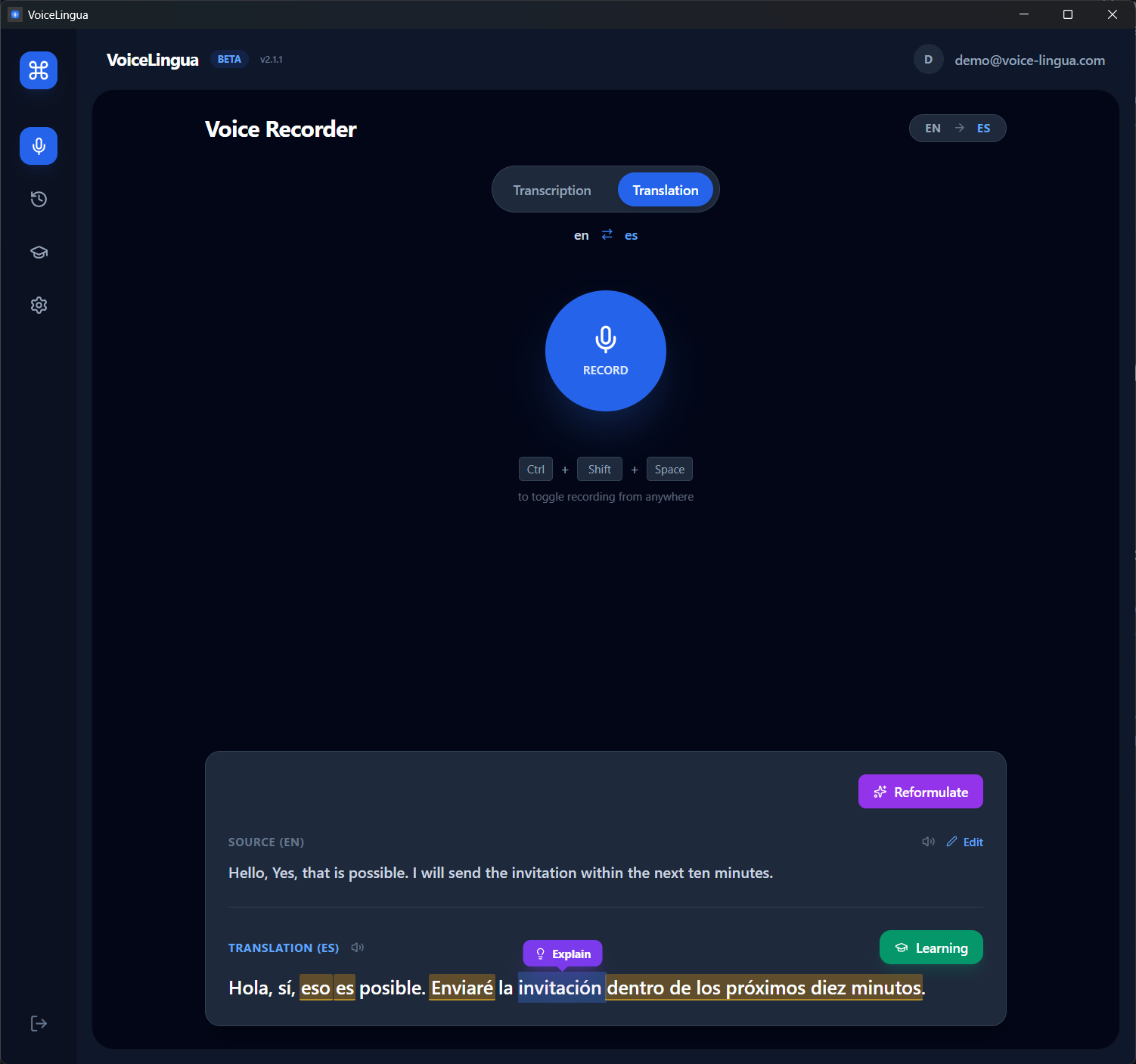
Select the word
In any transcription or translation, highlight a word or expression you didn't understand.
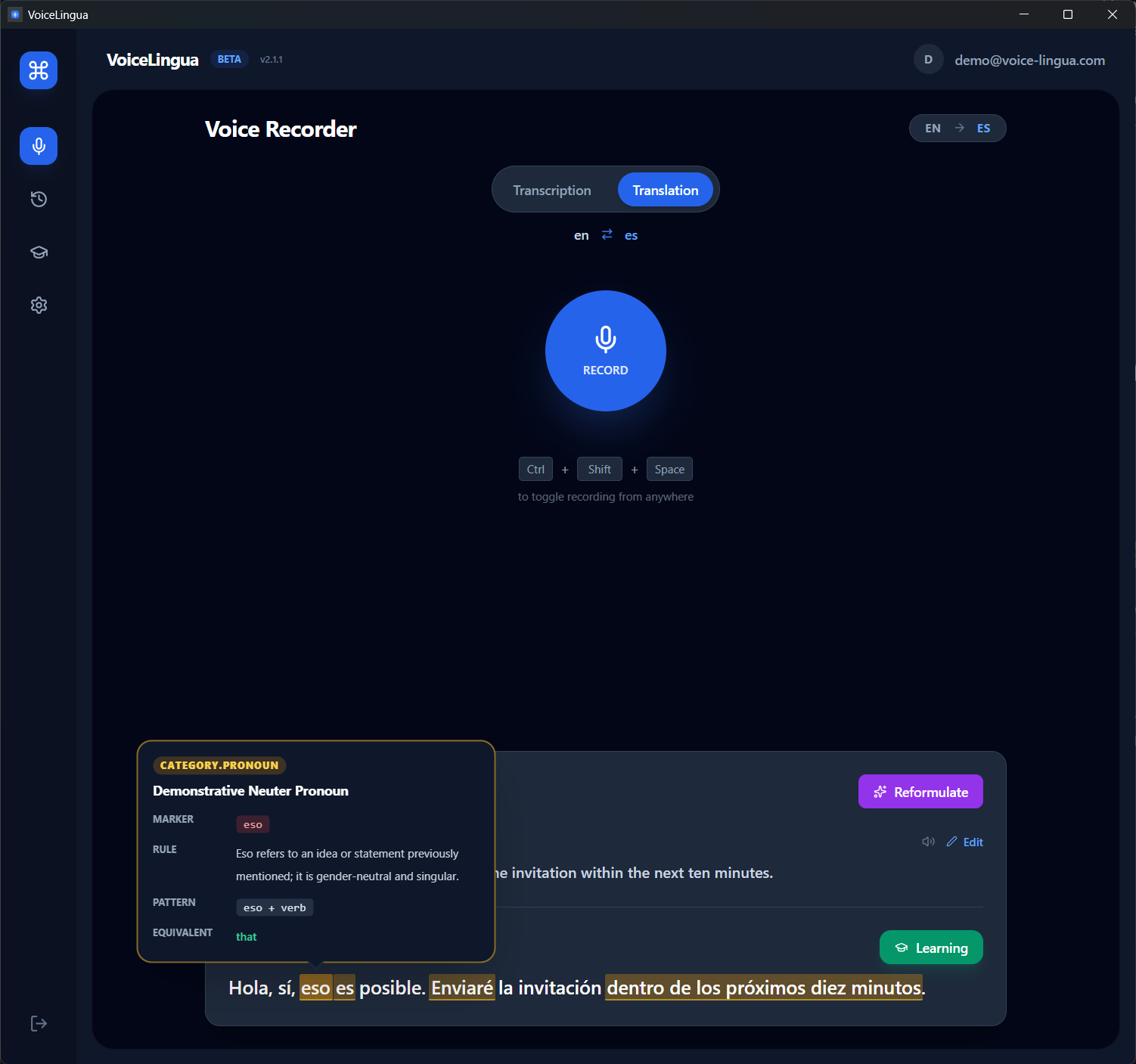
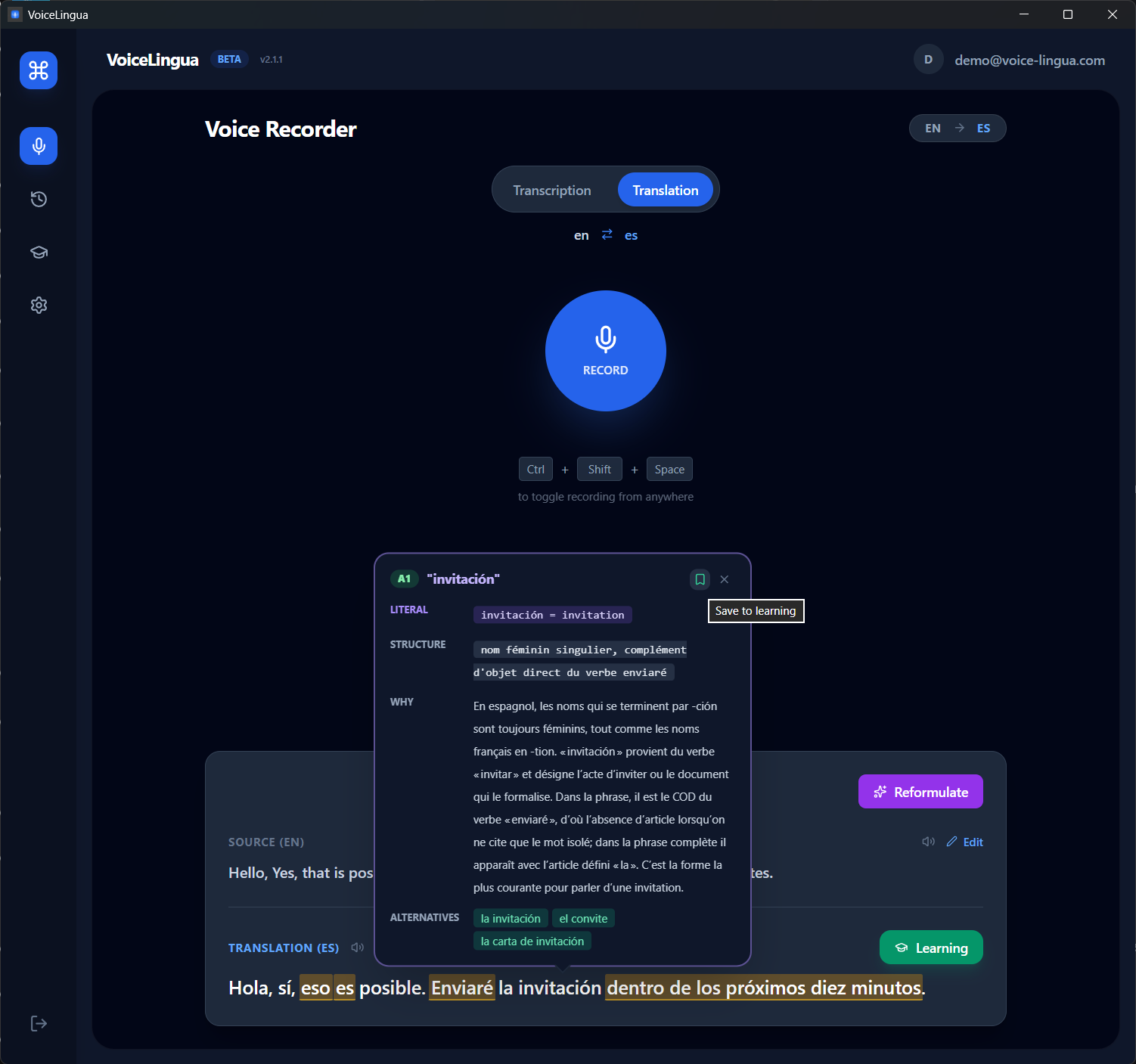
See what it means
Contextual definition, the grammar rule behind it, difficulty level (CEFR), and other ways to say the same thing.
The on-demand Explain panel is part of the Personal plan. On Free, AI flashcards are generated within your monthly transcription quota.
Review tomorrow. And the day after.
The word joins your Learn space as a flashcard scheduled with the SM-2 spaced-repetition algorithm. It comes back when it's time to review.
Add your own flashcards too
Saw a word on a sign, in a subtitle, in a message? Create a card manually — it joins the same spaced-repetition queue. Two sources, one learning flow: generated from your transcriptions, or added by hand.

Review at the right time
Every saved word or grammar rule follows an SM-2 spaced-repetition schedule. Open your Learn space and the cards due today are waiting — grade each one with a tap (Again, Hard, Good, Easy), and listen to any card's pronunciation (text-to-speech). If you want, an optional daily reminder lets you know when cards are waiting — on Windows and Android.
Speak your language. Read the one you're learning.
Writing a message in English? Only your English lands where you type. But while you speak, a small always-on-top window — shown only if you want it, placed wherever you like — displays the live translation.
You dictate, the text lands
In the active text field, your dictation is transcribed and inserted as-is — in your language.
The panel translates while you speak
Always on top, never in the way: it doesn't steal focus and closes in one click. Every sentence you dictate becomes an example in the language you're learning.
A word catches your eye? Select it
It becomes a flashcard in your SM-2 review queue — with an in-context AI explanation on Personal — without leaving what you were doing.
It works right inside your other apps.
VoiceLingua isn't a closed translator you switch into. Wherever you read, write or listen, it's one gesture away.
Android
Windows
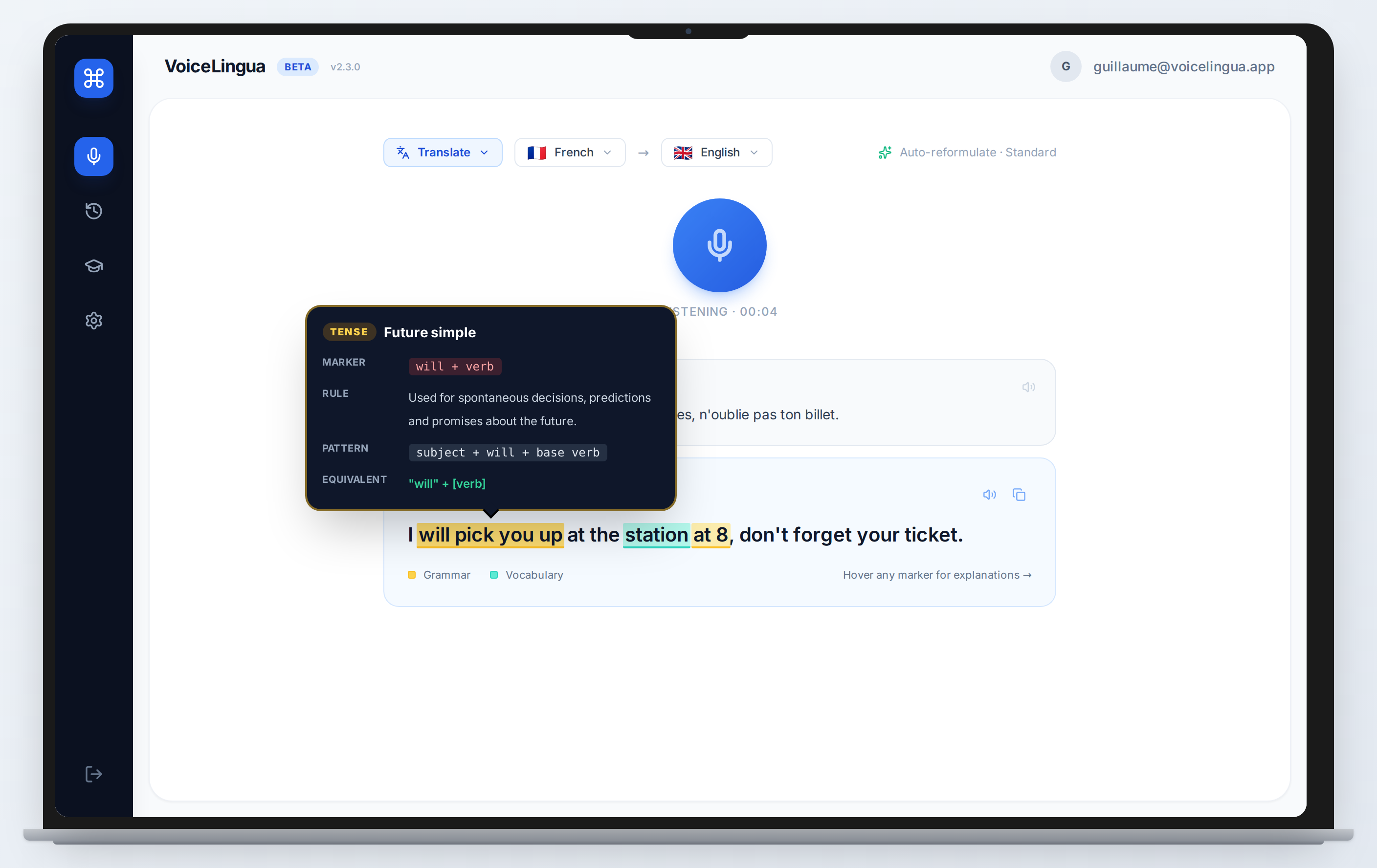
You're abroad and can't follow the conversation
A waiter in Barcelona, a receptionist in Berlin — place your phone on the table (Android) or hit the global shortcut (Windows). The conversation is transcribed and translated live, and you can reply by speaking in your own language. Afterwards, every word that blocked you is one tap away from becoming a flashcard.
- Real-time transcription and translation
- 8 languages: FR, EN, ES, DE, IT, PT, JA, ZH
- The words you missed can become flashcards
A client writes in a language you don't master
Your Spanish client sends a message that deserves a professional reply. You know what you want to say, not how to phrase it. Dictate in your own language; VoiceLingua translates it, applies the tone the situation calls for — professional for a client, casual for a friend — and drops the text straight into the reply field, without leaving Slack or your inbox. And the words you didn't know feed your flashcards.
- Dictate, translate, insert into the text field
- With Personal: 3 tones and 3 formats when the phrasing matters
- Reply in situations you'd otherwise avoid — that's practice too
See the whole flow in action.
Product demo — reading an email in another language and replying by voice.
Simple, honest pricing
Free
Start learning at your own pace
- 25 min/month transcription (15 desktop + 10 mobile)
- 8 languages
- Translation
- Personal flashcards (manual)
- AI flashcards (within quota)
- 10 TTS / month
- Explain (AI word & grammar explanations)
- Corrections
- Tones & reformulation
- Writing formats
- Priority support
Personal
≈ $8.25/mo
For everyday language learners
- 2h/day desktop + 1h/day mobile transcription
- 8 languages · Translation
- Personal + AI flashcards (unlimited)
- Unlimited TTS (fair use)
- Explain (AI word & grammar explanations)
- Corrections & reformulation
- 3 tones (Standard, Casual, Professional)
- 3 formats (Paragraph, Summary, Short message)
- Priority support
Auto-renews annually until cancelled. Cancel anytime.
Prices in USD or EUR. desktop = Windows, mobile = Android. Billed via Paddle (our Merchant of Record), who handles VAT/sales tax. Auto-renews until cancelled. Cancel anytime from your account. 14-day refund on first purchase — see our Refund Policy.
Download VoiceLingua
25 minutes of transcription included every month. No credit card. Try it on your real use case.
Android 9+ / Windows 10+. Free account required. Audio is processed in real time and isn't stored permanently — see our Privacy Policy.
Frequently asked questions
What exactly does VoiceLingua do?
It's a language-learning tool that captures real life. You transcribe conversations or dictate on Android or Windows; the words and grammar rules you don't understand become flashcards; spaced repetition brings them back when it's time to review. Dictation, real-time transcription, and translation are all ways to feed the learning loop.
How is VoiceLingua different from Duolingo or LingQ?
Duolingo and other course apps walk you through pre-made lessons. LingQ starts from content you import — articles, podcasts. VoiceLingua starts from your real life: the conversations you transcribe and the messages you dictate become the learning material. It's not a curriculum; it's a learning layer on top of situations you already live — with in-context explanations and flashcards created automatically, then reviewed with spaced repetition.
On which platforms is it available?
Android (on Google Play) and Windows (installer). iOS is planned.
Do I need to create an account?
Yes, a free account is required. You get 25 minutes of transcription per month (15 desktop + 10 mobile) at no cost. No credit card needed.
Is my audio stored on your servers?
No. Audio is processed in real time and is not stored permanently. Only transcriptions, translations and flashcards are saved in your account so you can review them.
How do reviews work?
Every word or grammar rule you save becomes a flashcard on an SM-2 spaced-repetition schedule. When cards are due, they're waiting in your Learn space — review takes one tap per card (Again, Hard, Good, Easy). An optional daily reminder can notify you when cards are due.
What's included in Free vs Personal?
Free includes 25 min/month of transcription, translation, manual flashcards, AI flashcards within that quota, and 10 TTS per month. Explain, corrections, reformulation, tones and writing formats are part of Personal, along with 2h/day (desktop) + 1h/day (mobile) transcription and unlimited TTS.
What's coming next
VoiceLingua is in active development. Here's what we're building.
Gamification
Streaks, XP, levels and achievements to keep you motivated and consistent.
iOS app
A native iOS version with the full feature set, for iPhone and iPad.